An AI agent that evolves with you.
No subscriptions, no ads, no analytics.
Give it a goal and it works with real tools: the browser, your files, your accounts, the phone itself. What comes back is something you can open, run or send.
Models
Cloud or on-device
- Twenty-four providers wired up, and any OpenAI-compatible endpoint you add
- GGUF models through llama.cpp and LiteRT models such as Gemma 4, on the phone itself
- Switch provider or model mid-conversation, with fallbacks
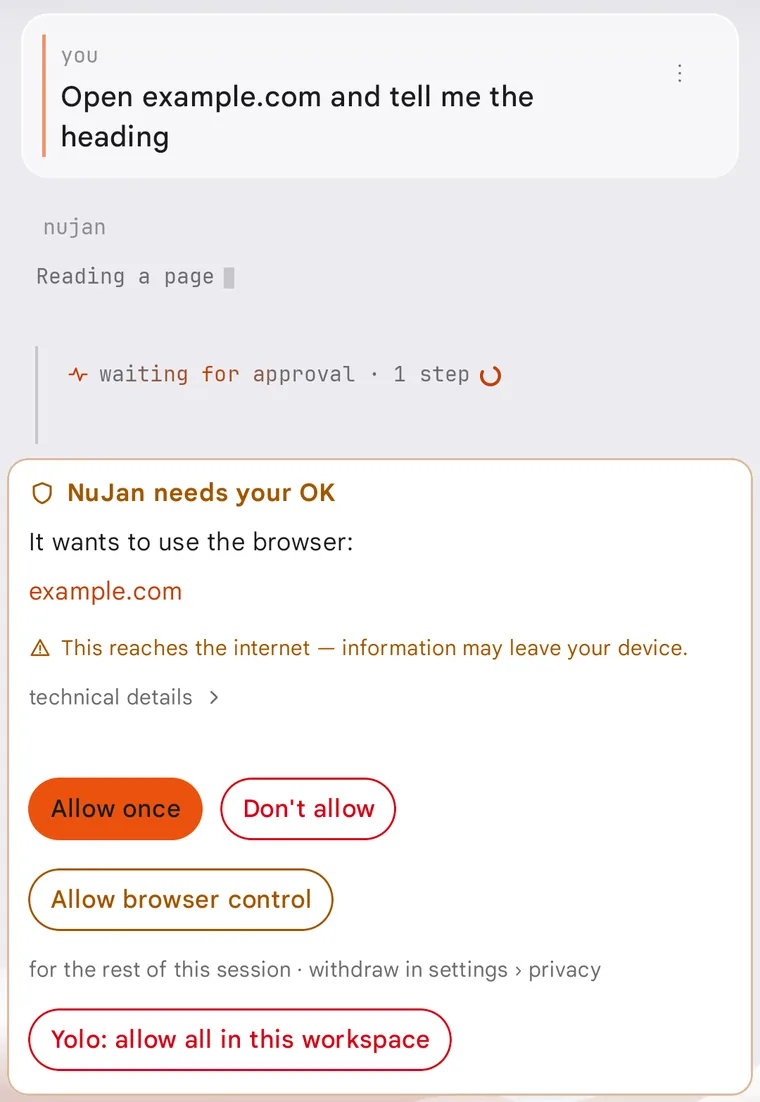
Tools
It asks before sensitive steps
- Browses in its own browser: opens pages, fills in forms, takes screenshots
- Writes and runs Python, and reworks the code when it fails
- Makes PDFs, Word files, slides and spreadsheets, and pushes to Git
Yours
It grows as you add
- Skills you write as a SKILL.md, or ask it to write for you
- MCP servers, and apps on your phone that speak ATP, add tools behind the same permission gate
- Routines on a schedule, widgets it builds for your home screen
Providers
Bring your own provider.
Twenty-four are wired up already: paste a key and pick a model. Twenty-two of them speak the OpenAI-compatible API, so anything else that does works too: a gateway, a router, or a server you run yourself. Add it by URL.
- Google Gemini
- OpenRouter
- Groq
- DeepSeek
- Mistral AI
- xAI
- Together AI
- Fireworks AI
- Cerebras
- Perplexity
- Cohere
- Anthropic (Claude)
- opencode zen
- opencode go
- KiloCode
- Ollama Cloud
- OpenAI
- Kimi (Moonshot)
- Vercel AI Gateway
- Z.ai
- Reflection
- NVIDIA
- Alibaba Model Studio
- Scaleway
Appearance
It recolours its own interface.
Eleven presets ship with the app. Describe another and it writes one, then sets a live animated backdrop to match.
Daybreak
Aurora
Slate
Midnight
Ember
Sage (light)
Phosphor green
Amber CRT
Solarized dark
Ice blue
Paper (light)
How it works
Give it a goal. It does the work.
Give it a task. It calls a real tool, reads what actually came back, and works to fix what broke. By default it asks before personal information goes to a cloud model; web pages and workspace files are sent without asking unless you change that. Tool calls are recorded in an audit log on the phone. It remembers what it learns about you, and can write itself new skills.
- You ask.A goal in plain words, not a command.
- It picks a tool.And by default asks before personal information goes to a cloud model.
- It reads what came back.Then works to fix what broke.
- It works until it is done.And hands back something you can open, run or send.
What it does
Runs both cloud and local models.
- Tools from apps on your phone
- Other apps can offer NuJan their tools through ATP, the App Tools Protocol, which is compatible with MCP. You choose which apps connect, each app asks you on its own screen, and NuJan asks before using one unless you allow it for the session or turn on auto-approve.
- NuJan over any app
- Make it your phone's assistant and call it up over whatever you are doing, or turn on a bubble that floats over other apps and opens your session in a panel. As your assistant, it uses what is on screen only when you allow it.
- Talk to it, hear it answer
- Dictate in the chat with the phone's speech recogniser, Whisper running inside NuJan, or Groq, and in the assistant panel or the bubble with the phone's recogniser. Replies can be read aloud in the phone's own voices, which can work offline, or in Gemini's.
- Interactive figures, in 3D too
- Ask it to show how a machine works and it can draw the machine to scale as a figure you step through, with each step read aloud. Pinch to zoom, tap a part to ask about it, and ask for 3D to turn it round. It has three.js built in, so it runs offline in the app.
- Games it builds, played in the app
- Describe a game and it writes it as one page, with Phaser for 2D or three.js for 3D, both built in. You play it in the app, offline.
- Find a moment in a video
- Attach or share a video and describe the moment you want. A model on the phone finds it by what it shows and cuts it as a clip; the video is never sent. It needs a one-time 485 MB download.
- Goals that keep going
- Type /goal and what you want done. It works in rounds, one turn after another and also while NuJan is closed, and checks the files and pages it made before it calls the goal met.
- Ask several models at once
- Put a hard question to a panel of models and see where they disagree. Merge their answers, let a judge weigh them, have them debate, or let a judge pick the best one.
- It redesigns its own app
- Ask for a new look and it recolours the app around one accent colour, then sets a live animated backdrop: ribbons, waves, a night sky, embers, or one it writes from scratch when none of those will do.
- Local LLMs, actually local
- Run a GGUF model through llama.cpp or a LiteRT model such as Gemma 4 on the phone itself, with no API key and no account.
- MCP servers, plugged in
- Connect a Model Context Protocol server and its tools join the toolbox, behind the same permission gate as everything else.
- Sub-agents, on a phone
- A job that deserves its own context gets its own agent with its own tool budget, and reports back when it has finished.
- Agent skills you write yourself
- Install a skill, a SKILL.md in a .zip or a GitHub repository, and it learns a new workflow, checked against the tools it may use. Or ask it to write one for you.
- Home-screen widgets it builds
- Ask for a widget and it writes one, previews it and offers to pin it. The widget keeps its own content current without you opening the app.
- Runs Python, not just prints it
- Python scripts and web pages it writes are run in a sandbox on the phone, and one that fails is sent back to be fixed and tested again.
- Drives a real browser
- Not just fetching. It clicks, scrolls, fills forms, uploads files and screenshots the page, so JavaScript-only sites are not a wall.
- RAG over your own notes
- Notes with backlinks, a searchable memory and a knowledge graph it builds as it goes. Ask questions against what you already wrote.
- Deep research, with receipts
- Multi-source research runs that cite what they used, and a separate fact-check that rates each claim against the sources it found and names the ones it could not confirm.
- Pictures, audio and short videos
- Connect an image provider such as Gemini or OpenAI and it draws illustrations and mockups. It writes podcasts and briefings for the phone to read aloud, and renders motion graphics to a video of up to a minute with a voiceover.
- Bring your own API key
- Twenty-four providers wired up, among them OpenRouter, Groq, opencode zen and go, KiloCode, Ollama Cloud, DeepSeek, Anthropic and OpenAI. Any other OpenAI-compatible endpoint works too, and you can switch mid-conversation. Or start on a cloud model that needs no key or account; it may train on your prompts.
- Vision, on device or cloud
- It looks at an image, a page it just rendered, or the browser tab it is driving, and acts on what it actually sees.
- PDF, Word, slide decks and spreadsheets
- Creates and reads them. PDFs and Word documents carry the pictures you attach or it saves from the web. It exports .pptx and .xlsx, lets you sign a PDF, and pulls text out of scans with on-device OCR.
- git push, from your phone
- Clone, commit, diff, pull and push for real, plus GitHub issues and code search. Real repositories, from a phone.
- Decision models for quick calls
- An automation can fire on what a notification means, not just the words in it. A decision model answers those yes-or-no calls: a small model you install on the phone, or a cloud model you choose if you let notification text go to the cloud.
- Scheduled agents
- Routines and reminders fire on their own while the phone is in your pocket, with hooks into Tasker and MacroDroid for the rest.
- Notifications, both ways
- Work you start shows its progress in a notification, and an approval can be answered right from it. With notification access, it also summarises what you missed from the apps you pick.
- Phone settings, by asking
- It switches the torch, sets volumes, Do Not Disturb, brightness and screen timeout, and opens the right system page for the rest. By default, it asks before each change.
- Every tool call gated and logged
- Every tool call passes a permission gate: some tools run freely, some ask you first, and some are refused. Calls are recorded in an audit log kept on the phone.
- No subscription
- You pay once and keep it. No renewal, no expiry. After an install, an update or cleared data, NuJan reaches its licence service once before it works, even with a model on the phone.
- No ads
- Nothing in the app is sold to an advertiser, and no part of the interface is for rent.
- No profile of you
- No NuJan account and no advertising ID. You sign in only to services you connect, such as Google or GitHub.
- No usage tracking
- No analytics or crash-reporting SDK. NuJan's licence service is used only for your free trial and purchase, product news, OpenRouter sign-in, and the replies you report or deletion requests you send. Google Play's own diagnostics are covered in the privacy policy.